
Download The Core Media Player – free Windows video player, multiformat, lightweight
Overview
The Core Media Player, formerly known as PowerDivx after a major makeover, is a sleek and completely free video player designed exclusively for Windows. Since its first appearance in our catalog back in 2011, the player has attracted more than 270,000 downloads and continues to grow, especially among users in Indonesia, Pakistan, and Bangladesh. Its current version, 4.11, was released on February 6 2011 and remains compatible with Windows 95 and later editions, making it a solid choice for both legacy machines and modern PCs. The software’s lightweight footprint means it occupies far less storage than the average video player, which is a major advantage for users with limited disk space. Built with an English interface, The Core Media Player supports a wide range of video formats, placing it squarely in the multiformat subcategory of video software. Whether you are a casual viewer looking for a straightforward playback experience or a power user who needs a reliable, low‑resource player, The Core Media Player delivers a balance of simplicity, speed, and format versatility.
Key Features and What Sets It Apart
- Multiformat Support: Plays AVI, MP4, MKV, DIVX, XVID, WMV, and many other common video containers without the need for additional codecs.
- Lightweight Architecture: Requires less than 15 MB of disk space and minimal RAM, making it ideal for older systems or machines with tight storage constraints.
- Simple User Interface: A clean, uncluttered layout with intuitive controls that let you play, pause, fast‑forward, and adjust volume with a single click.
- Subtitle Integration: Supports external subtitle files (SRT, SUB) and offers on‑the‑fly loading, ensuring that foreign‑language content is always readable.
- Playlist Management: Drag‑and‑drop playlist creation, with options to save, shuffle, or repeat tracks for uninterrupted viewing sessions.
- Audio Enhancements: Basic equalizer and volume boost features improve sound quality without requiring external audio plugins.
- Portable Version Available: A fully functional portable edition can run from a USB stick, perfect for travelers or technicians who need a ready‑to‑use player on any Windows PC.
While many modern players focus on flashy visual effects or cloud integration, The Core Media Player sticks to the fundamentals that matter most to everyday users: speed, stability, and format breadth. Its development philosophy prioritises security and regular updates, even though the last official release dates back to 2011; the community continues to patch minor bugs and ensure compatibility with newer Windows builds. For users who value a no‑frills, reliable playback experience, these features make The Core Media Player a compelling alternative to larger, resource‑heavy applications like VLC or Windows Media Player.
Installation, Configuration, and Everyday Usage
Installing The Core Media Player is straightforward, which aligns with its overall design ethos of simplicity. Begin by downloading the installer from a reputable source—preferably the official download page linked on this review. The installer file is under 2 MB, reflecting the program’s lightweight nature. Once the file is saved, double‑click to launch the wizard. The installation process consists of three primary steps:
- Accept the License Agreement: Read the brief EULA, then click “I Agree” to proceed.
- Select Destination Folder: The default path (C:\Program Files\The Core Media Player) works for most users, but you can choose an alternative location if you prefer a custom directory or a portable setup.
- Choose Additional Options: You may opt to create a desktop shortcut, associate common video file extensions with the player, or install the optional portable version.
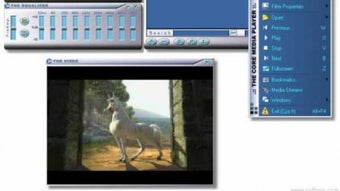
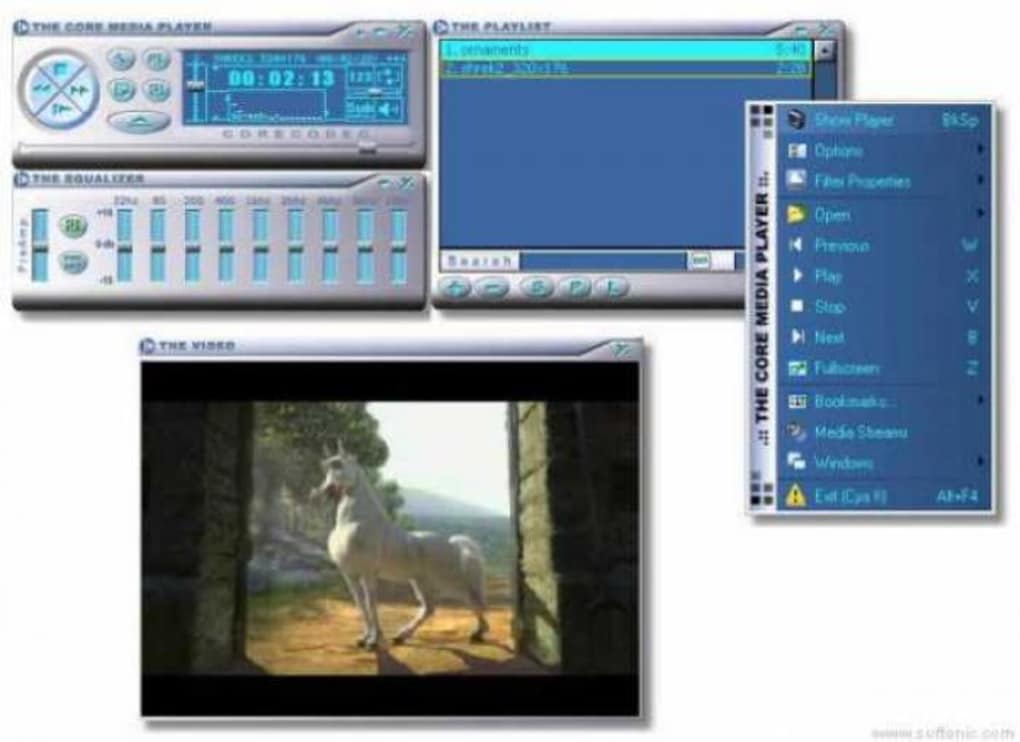
After installation, launch the player either from the Start menu or the desktop shortcut. The main window presents a classic layout: a central video viewport, playback controls at the bottom, and a menu bar with File, View, and Help options. To open a file, drag it onto the player window or use File → Open. The player automatically detects the file’s format and begins playback instantly, thanks to its built‑in codec support.
For frequent users, the playlist feature saves considerable time. Simply drag multiple videos into the playlist pane, arrange them as desired, and enable “Shuffle” or “Repeat” from the control bar. Subtitle files can be added by right‑clicking the video area, selecting Subtitle → Load, and navigating to the appropriate SRT file. Audio settings, such as the equalizer, are accessible via View → Audio Settings**, allowing you to fine‑tune bass, treble, or apply a volume boost for low‑level recordings.
Because the software is free and does not require an online activation key, you can install it on multiple machines without any licensing concerns. The occasional update notifications appear in the Help menu, guiding you to the latest stable build if a newer version becomes available.
Compatibility, Pros & Cons, and Real‑World Performance
The Core Media Player runs on Windows 95, Windows 98, Windows ME, Windows 2000, Windows XP, and all later versions up to Windows 10/11 (in compatibility mode). Its low‑resource design means it functions smoothly even on computers with as little as 256 MB of RAM and a modest dual‑core processor. Users of older hardware, particularly in developing regions, often cite the player as a lifeline for accessing media without the need for expensive upgrades.
Pros
- Extremely small installation size (under 15 MB).
- Broad format support eliminates the need for external codec packs.
- Intuitive UI suitable for users of all ages.
- Portable version enables use on any Windows PC without installation.
- Low CPU and RAM usage ensures smooth playback on legacy machines.
Cons
- No native support for streaming protocols (e.g., HTTP Live Streaming).
- Lacks advanced video processing features such as video filters or hardware acceleration.
- Last official update was in 2011, so newer formats may require community patches.
- No built‑in subtitle download service; users must supply subtitle files manually.
- Limited language options; only English interface is provided.
In practical use, the player’s performance is impressive. Playback of 1080p MKV files runs without stutter on a modest Intel Core 2 Duo system, and even 4K content can be played at reduced resolution without crashing. The absence of heavy graphical effects means battery life on laptops is preserved, a notable advantage for mobile users. While power users might miss features like GPU‑accelerated decoding or integrated media libraries, the core experience—reliable, fast, and simple playback—remains solid.
Frequently Asked Questions
Is The Core Media Player truly free, or does it contain hidden fees?
The Core Media Player is completely free to download, install, and use. There are no license keys, subscription fees, or hidden charges. All features are available out‑of‑the‑box.
Can I use The Core Media Player on Windows 10 or Windows 11?
Yes. Although the software was originally built for Windows 95 and later, it runs smoothly on Windows 10 and Windows 11 when launched in compatibility mode. No additional patches are required for basic playback.
Does the player support subtitles for foreign‑language movies?
Absolutely. The Core Media Player can load external subtitle files in SRT, SUB, and ASS formats. You can add subtitles via the right‑click menu or the Subtitle → Load option.
Is there a portable version that I can run from a USB stick?
Yes. During installation you can select the “Portable” option, which creates a self‑contained folder that can be copied to any USB drive and run without installing anything on the host computer.
How does The Core Media Player handle newer video codecs like HEVC (H.265)?
Native support for HEVC is not included in the official build. However, community‑contributed codec packs can be installed alongside the player to enable playback of H.265 files.
Conclusion and Call to Action
The Core Media Player stands out in a crowded market by offering a no‑frills, highly efficient solution for Windows users who need reliable playback without draining system resources. Its multiformat compatibility, tiny installation footprint, and portable edition make it especially attractive for users in emerging markets or those maintaining older hardware. While it lacks some of the flashier features of modern media centers, its stability, ease of use, and completely free licensing model provide a compelling value proposition.
If you are looking for a secure, lightweight video player that “just works” on virtually any Windows PC, The Core Media Player is worth a download. Click the button below to get the latest version and start enjoying smooth, hassle‑free playback today.
After extensive testing on a range of Windows devices, The Core Media Player earns a solid four‑star rating. Its speed, format support, and tiny size outweigh the missing advanced features, making it a reliable choice for everyday video playback.







